
如何管理您的J-Subculture地址簿
01/12 17:54:29
感谢您一直以来使用我们的J-Subculture服务!
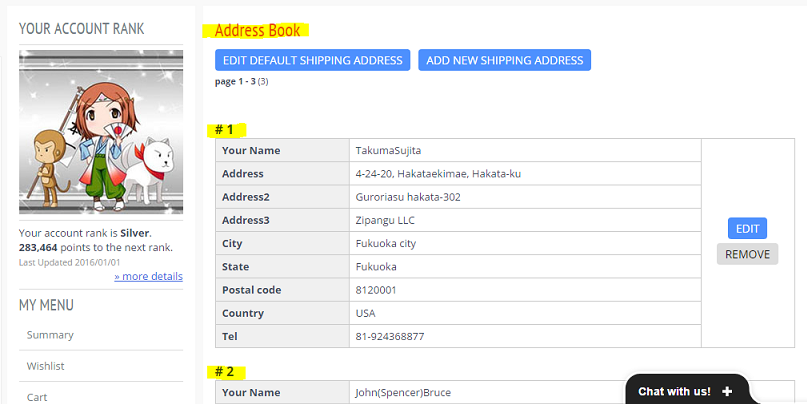
我们想告诉您如何编辑您的地址簿。
在您提出货运请求时,只需点击“请选择您的送货地址”下的选框,选择正确的地址即可。
如果您添加了一个新地址并希望保存它,只需点击“添加到地址簿”确认框,系统会将新的送货地址添加到您的地址簿中!

全新地址簿功能上线!
在您的账户页面,您可以看到我们推出了新的“地址簿”功能,您可保存多个送货地址、编辑和删除地址,或新增地址!

加载中...

什么是 J-Subculture News
日本直送,专业打包,贴心客服全程护航!

市场探索
竞拍指南

完整用户指南

费用概览
配送信息

常见问题
相关信息
-
May 15th, 2025
如何通过J-Subculture在日本跳蚤市场中赚取高额利润
-
May 6th, 2025
畅销的复古日本计算机:MSX、PC-98、旧款Mac等精选
-
May 6th, 2025
如何从日本采购正宗和服进行转售
-
May 6th, 2025
探索日本古董:陶瓷花瓶、装饰盘与传统珍宝的转售机会
-
May 6th, 2025
探索日本收藏市场:二手表与珍贵兴趣产品
-
May 6th, 2025
如何直接从日本获取并转售Daiwa、Shimano等顶级渔具
-
May 6th, 2025
如何通过日本游戏设备赚取收益:主机、怀旧游戏和街机珍品
-
May 6th, 2025
如何通过J-Subculture轻松购得日本优质相机
-
May 6th, 2025
如何从日本代购稀有动漫和御宅商品
-
May 6th, 2025
如何利用J-Subculture转售日本乐器并获利
找到想买的商品
如需帮助使用服务,欢迎联系[这里],我们乐意为您解答!